Fleet and operations software for South Africa. Stop asking where the driver is.
OPSEN is fleet and operations management software for transport, logistics, workshop and field service businesses. It runs the whole operation from one place: trips and dispatch, the fleet and its paperwork, job cards, tickets, fuel and the invoice at the end of it. The office watches it live, the field works from a phone that keeps going without signal, your customer gets a tracking link instead of phoning you, and a handwritten job card can be photographed straight into the system.
Most operations are held together by some combination of this:
It holds together right up until somebody is off sick, or a customer asks what happened on a delivery three weeks ago. OPSEN puts all of it in one place, and keeps a record of what happened.
Built for operations that cannot afford to guess
Transport and logistics, workshops and plant hire, field service, and any business where vehicles, technicians and jobs have to line up.
Operations managers
Plan and dispatch the day, see every trip and job in progress, and know about a problem before the customer phones about it.
Fleet and workshop
Keep every vehicle road legal and serviced, with document expiry dates that chase themselves and a failed inspection that grounds the vehicle.
Owners and finance
Cost per kilometre per vehicle, fuel you can account for litre by litre, and invoices built from work that happened.
Drivers and technicians
Today's trips, job cards and inspections on a phone built for the field, which keeps working when the signal does not.
Fourteen modules, switched on by plan
Each plan switches on the modules that kind of operation needs. A courier and a plant hire workshop are not running the same business.
Trips & Delivery
- 01Trips and dispatch
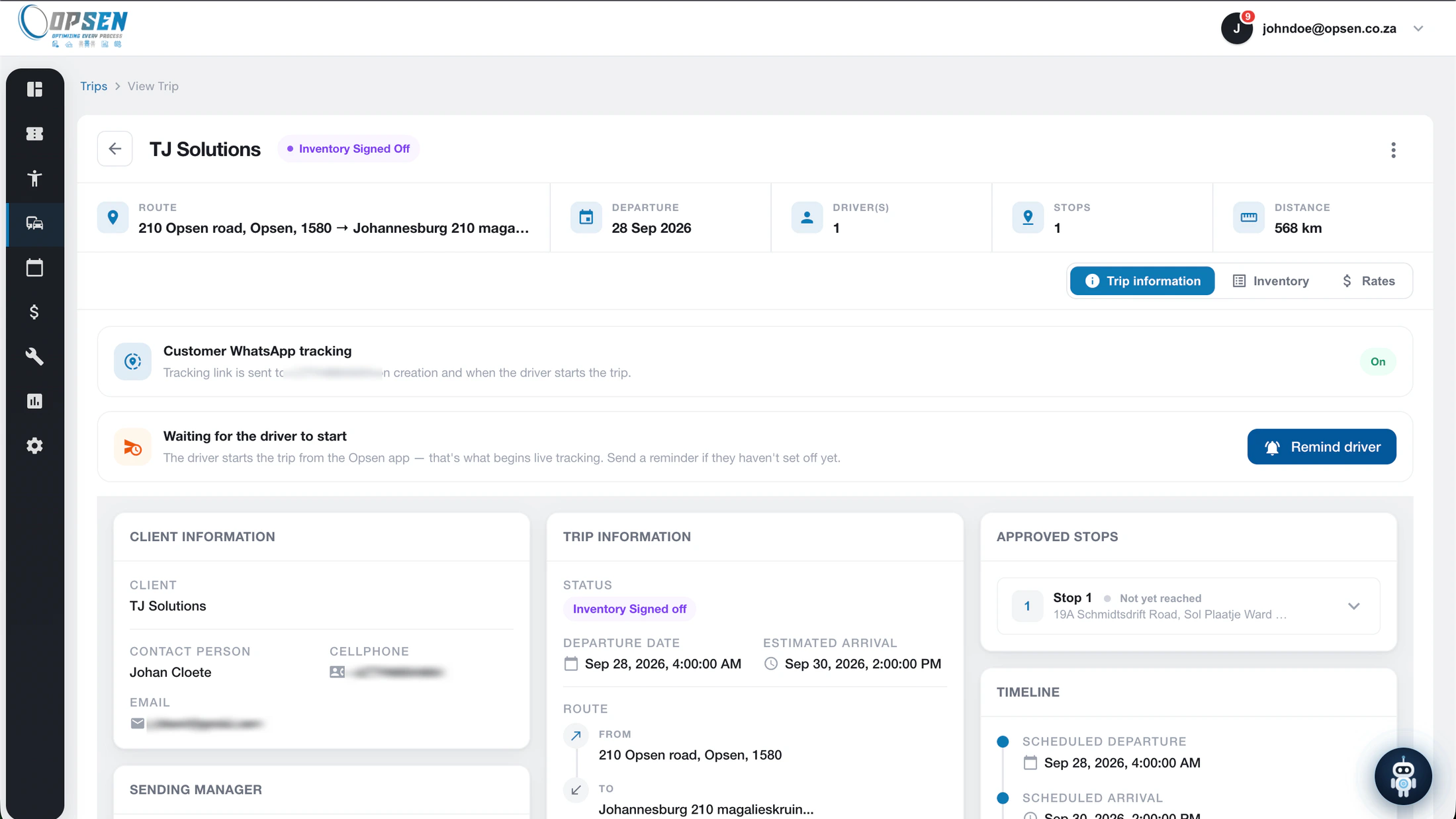
Multi-stop trips with the driver, vehicle and trailer assigned, priced from your own rates as you build them.
- 02Live tracking
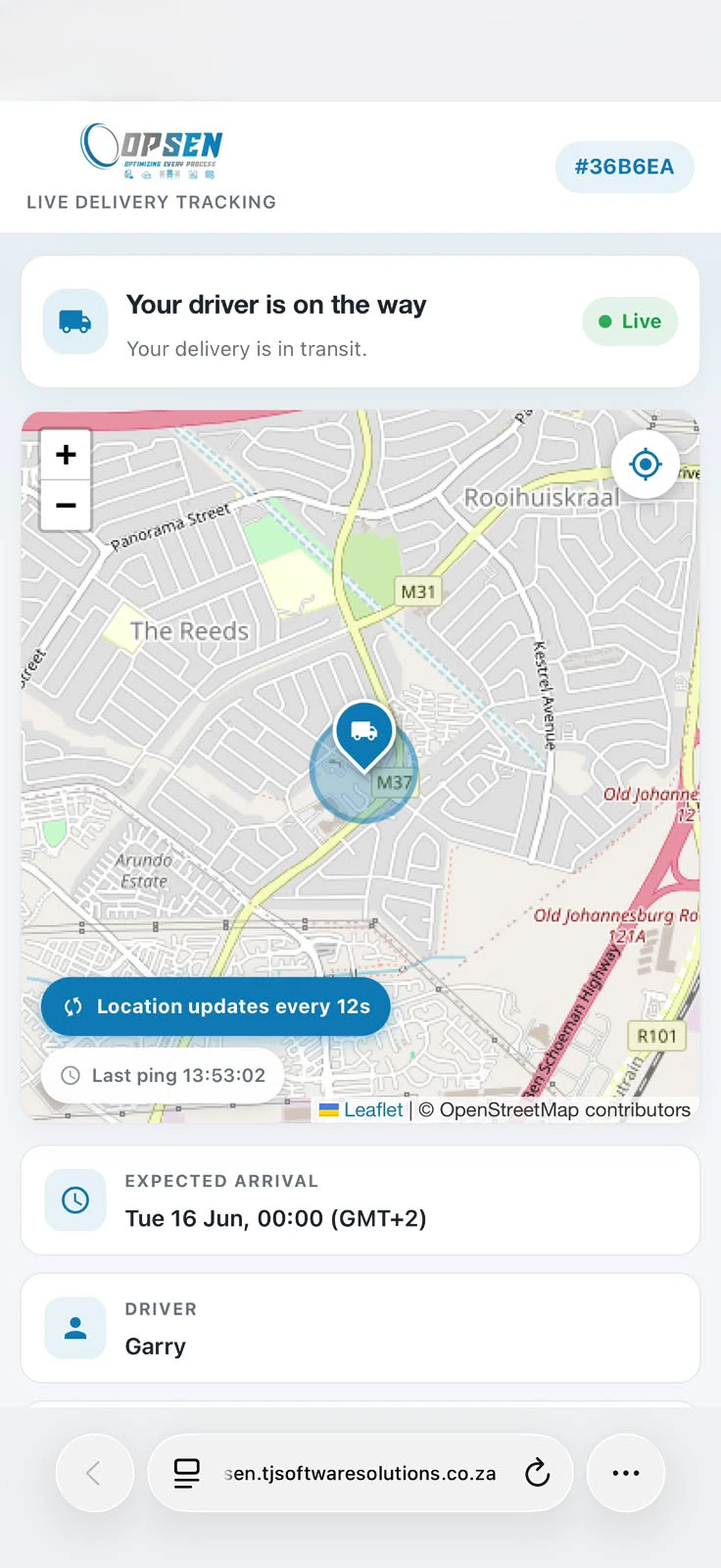
A tracking link the customer opens in any browser, off the driver phone. No hardware fitted.
- 03Proof of delivery
A photo, a signature and an odometer reading at each stop, timestamped against the trip.
Fleet
- 04Fleet register and compliance
Vehicles, trailers and their documents, with reminders before a licence disc, roadworthy or insurance lapses.
- 05Vehicle inspections
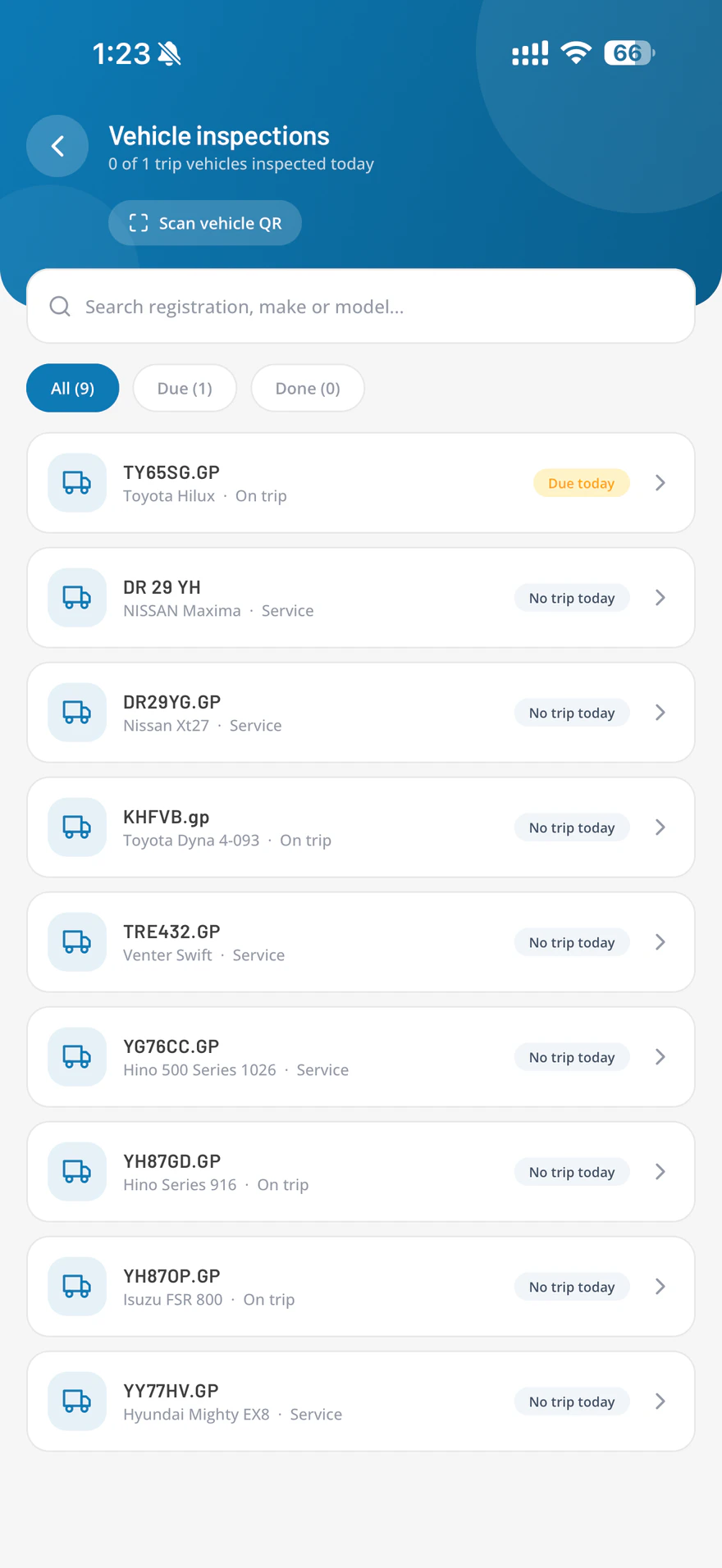
Daily driver checks from the phone. A failed item can ground the vehicle until someone signs it off.
- 06Fuel management
Bulk tanks, every litre in and out, and cost per kilometre per vehicle, with book level checked against a physical dip.
Work
- 07Job cards and work orders
Checklists, labour and parts off your stock, with sign-off gated on the checklist being finished. Photograph a handwritten job card and it is read into a draft for someone to approve.
- 08Tickets and helpdesk
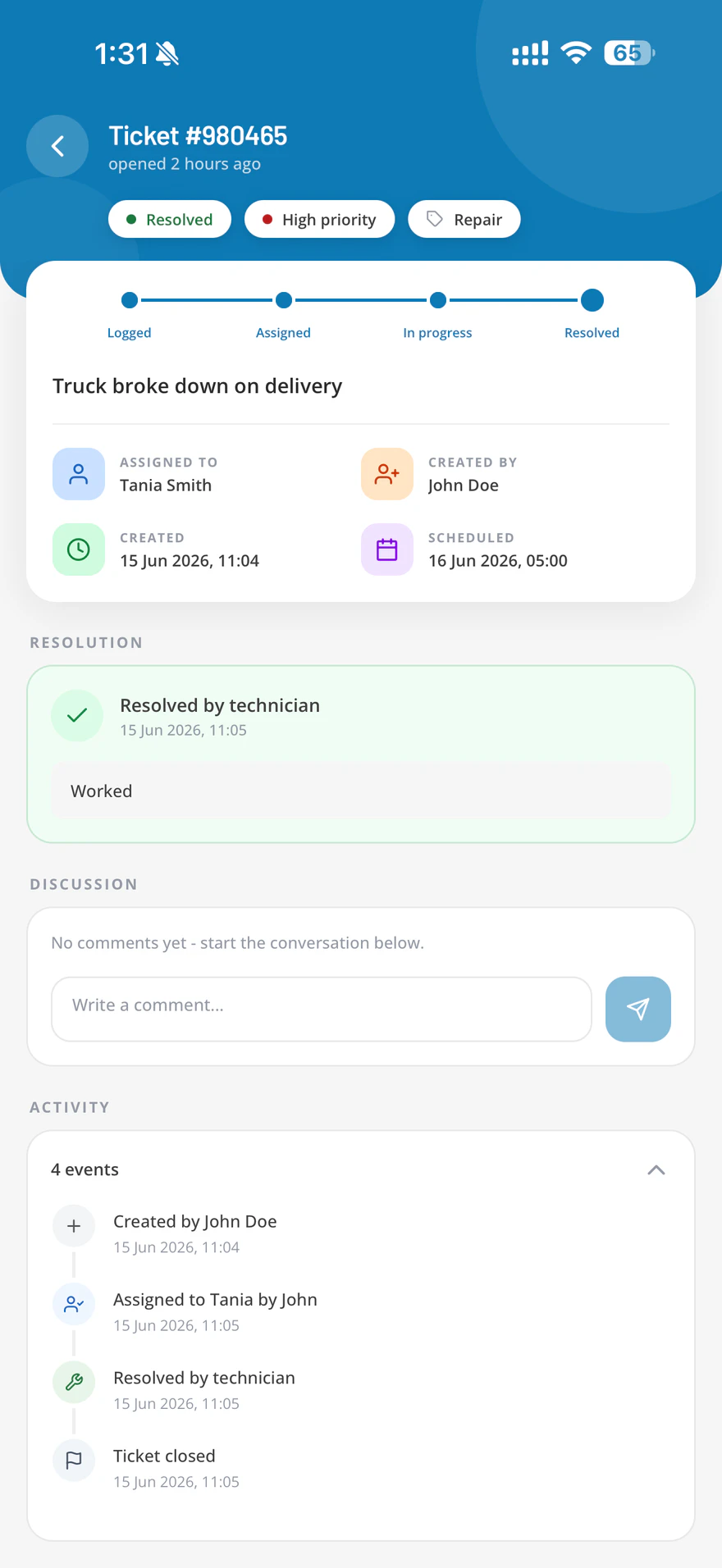
Issues captured, routed and tracked, with the full assignment history on the ticket.
- 09Inventory and stock control
What is on the shelf, what went onto which job, and what needs ordering.
Money
- 10Clients, quotes and invoicing
Quotes that become trips, and a month of completed work that becomes a branded invoice.
- 11Approvals and signatures
Sign-off steps for the things that need one, with a real signature captured on the device.
Running It
- 12Schedules, shifts and leave
Who is working, who is off, and who is free for tomorrow morning.
- 13SLA rules and automations
Your own rules for what counts as late, and the reminders and escalations that follow.
- 14Reports and KPIs
Operational numbers with CSV and PDF export, scheduled to arrive without anyone running them.
Driver records and user management come with every plan. Each plan includes a set number of users, drivers and vehicles, and you can add more at any time.
A screen for every part of the day
Captured from the live product. The list below is the menu your office team would see.
Overview
Trips
Fleet
Work
Clients
Admin
Dashboard
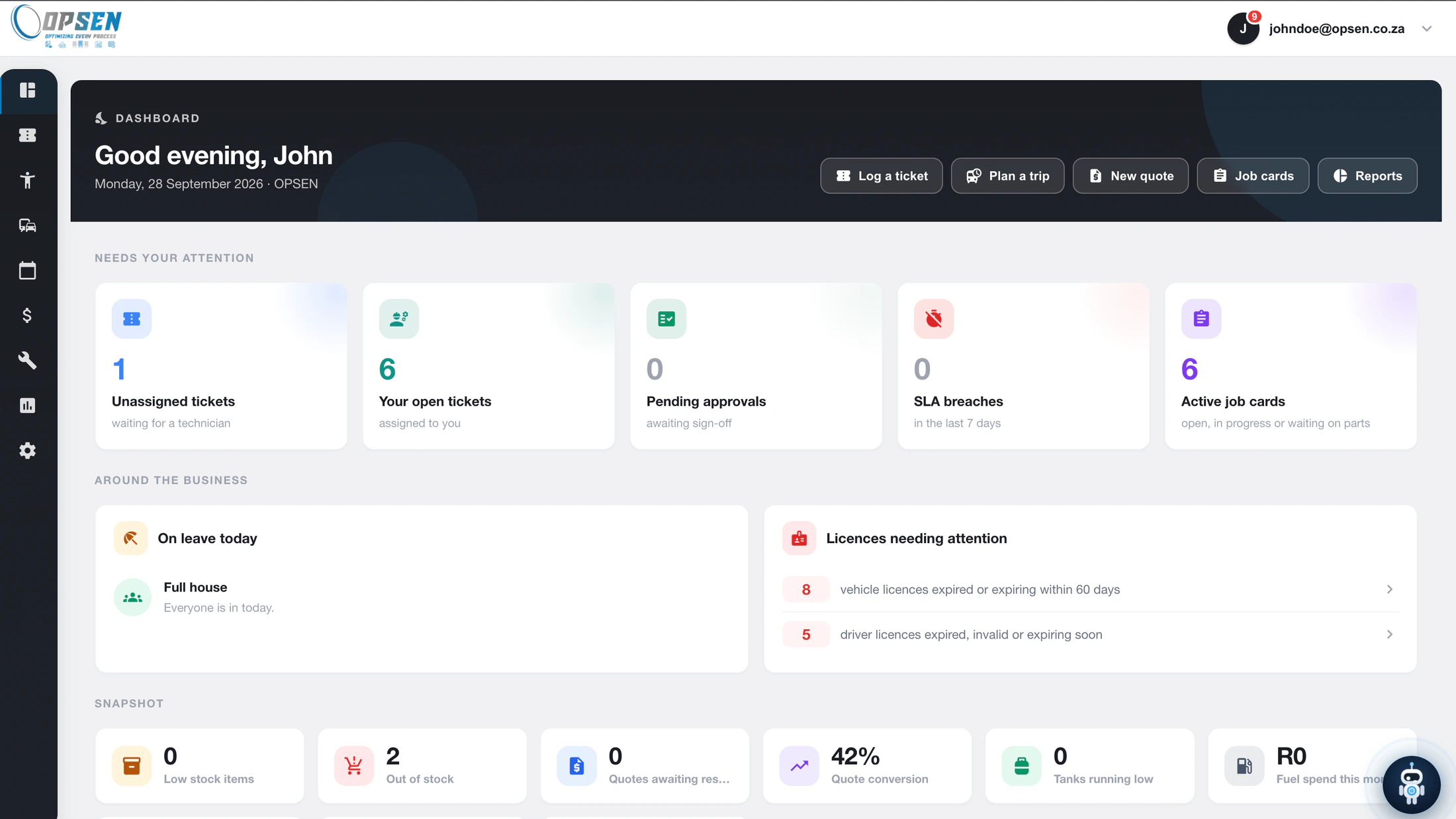
Everyone opens on what needs them: unassigned tickets, approvals waiting on their signature, SLA breaches in the last seven days and job cards still open. Below it, who is on leave today, which licences are about to expire, and a stock and quote snapshot.
Four things worth switching for
Most operations software gives you a nicer list. These are the parts that change what happens on the road and in the workshop.
No boxes to fit, and no second subscription
- The driver's phone is the tracker. Nothing is installed in the vehicle, so a hired truck or a subcontractor is on the system the same afternoon.
- No tracking unit to buy, fit, move between vehicles, or replace when one goes missing.
- Your customer gets a link when the trip starts, sent in one tap or on WhatsApp. It opens in whatever browser is already on their phone, with the driver on a live map and the arrival time you set when you planned the trip.
- The link goes dead shortly after the trip arrives. It is not a permanent window into your operation. Your own branding on the tracking page is available as an extra.
- Continuous location tracking runs only between Start trip and End trip, and the driver can see on their own screen when it is on. Outside a trip the only location reading taken is a single point recorded with a fuel entry.
Arriving is not the same as delivering. A stop that needs a photo or a signature is never ticked off automatically, so proof of delivery cannot be skipped by driving past.
The number that usually cannot be found
- Bulk tanks with every litre in and every litre issued, recorded against the vehicle, with the driver and a photograph of the pump captured alongside it.
- Litres per hundred kilometres and cost per kilometre, per vehicle, so the one that is drinking shows up on its own.
- The book level is reconciled against a physical dip, so an unexplained difference becomes a number on a screen instead of a suspicion.
- Low tank alerts before a driver arrives to find it empty.
A phone that keeps working without signal
- Trips, job cards, inspections and tickets are captured offline and sync when the signal comes back.
- Face ID, Touch ID or a fingerprint to sign in, so a driver is not typing a password at a weighbridge.
- Push notifications that open straight to the job, not to a home screen the driver then has to search.
- Built for the field rather than shrunk down from the desktop. Drivers see trips, technicians see job cards and tickets, and neither has to scroll past the other.
While offline, a geofence crossing is not detected until the phone reconnects, so arrival at a stop is confirmed by the driver instead.
Being able to show exactly what happened
- Signatures, photographs and odometer readings captured at the stop, timestamped and attached to the trip.
- Job cards that cannot be signed off with checklist items outstanding, and parts that come off stock as they are used.
- Approvals with a real signature, so a sign-off is a record and not a verbal agreement somebody remembers differently.
- An audit trail behind the lot, included from the Core plan up, for the conversation three weeks later about what was actually delivered.
The proof is in what it refuses to do
Any system can record what happened. These are the points where OPSEN stops somebody cutting a corner, which is where the argument with a customer three weeks later usually starts.
Signing off a job card with the checklist half done. Sign-off is gated on the checklist, so a job cannot be signed off with steps outstanding.
Ticking off a delivery by driving past it. A geofence proves the driver is there. It does not prove they delivered, so a stop that needs a photo or a signature still waits for one.
Sending out a vehicle that failed its inspection. A failed item grounds the vehicle until somebody with the authority to do so signs it off.
Quietly losing diesel. Every litre in and out is recorded against a vehicle, with the driver and a photograph of the pump captured on the entry. When the dip does not match the book, somebody has to explain the difference.
Using stock the workshop does not have. Parts come off the shelf as the job card uses them, so the count reflects the work rather than the last time somebody counted.
Starting the clock on a trip nobody has started. Tracking begins when the driver starts the trip. Until then the trip says so plainly, and offers to remind them.
Otto answers questions about your own operation
Ask in plain language instead of building a report. Otto reads your live OPSEN data and answers questions about trips on the road, services due, fuel spend, open tickets and deliveries still missing a signature.
It can answer, not change
Otto has no way to write to your data. It cannot dispatch, edit or close anything.
It only sees what you see
A driver asking Otto a question never gets more than a driver is allowed to know.
Off until you ask for it, and priced by the question
Otto is off by default and we switch it on for you. It is an optional add-on with a monthly allowance of questions, so the cost stays predictable.
Which vehicles are due for a service this month?
One vehicle has a service due this month: the Hyundai Mighty EX8, sitting at 386 000 km and already booked in.
Six others have service dates that have already passed, so they are worth a look while you are in there.
Otto is AI and can make mistakes. Check anything you act on.
The field does not sit at a desk
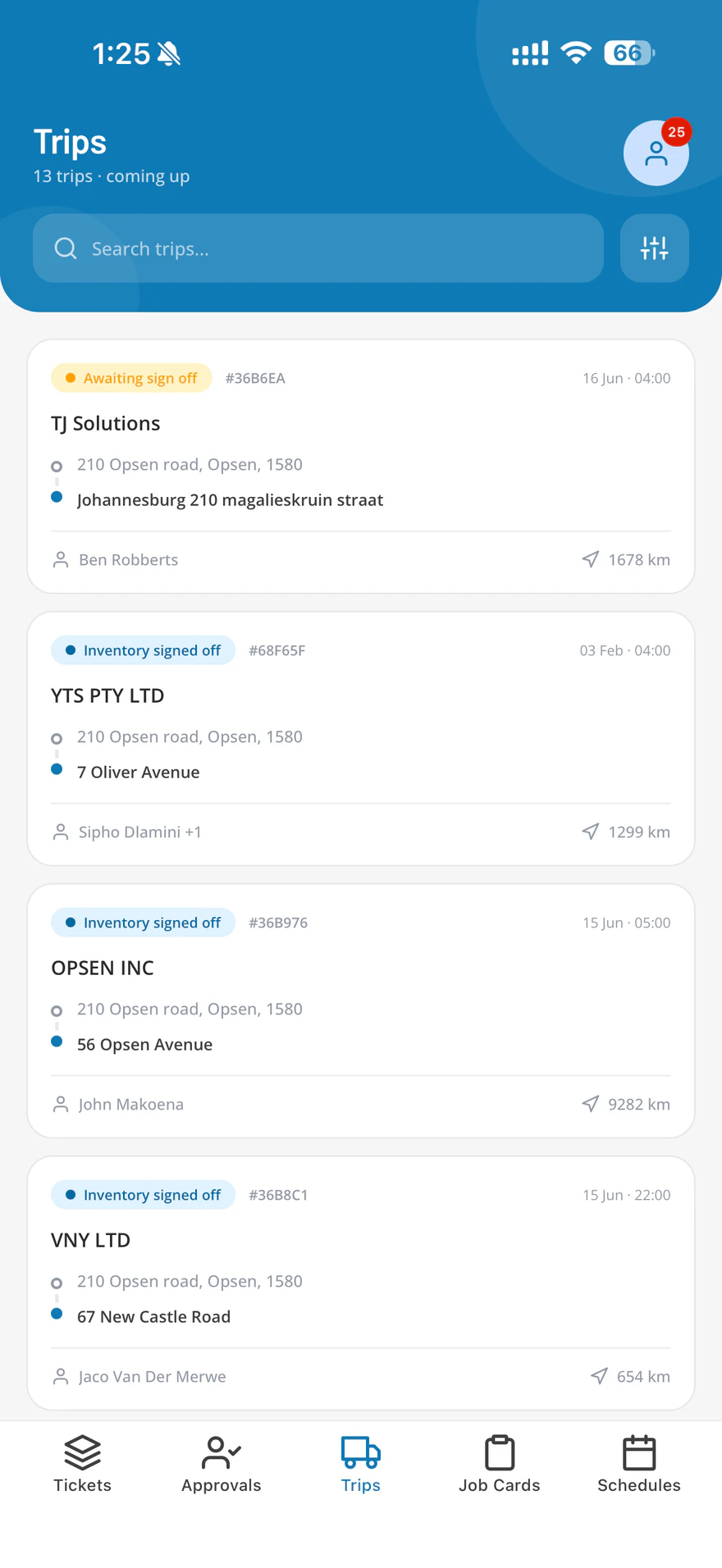
A proper iOS and Android app for drivers and technicians. It opens on today's work, and it keeps working in the places where signal does not.
Start the trip, do the stops, prove it happened
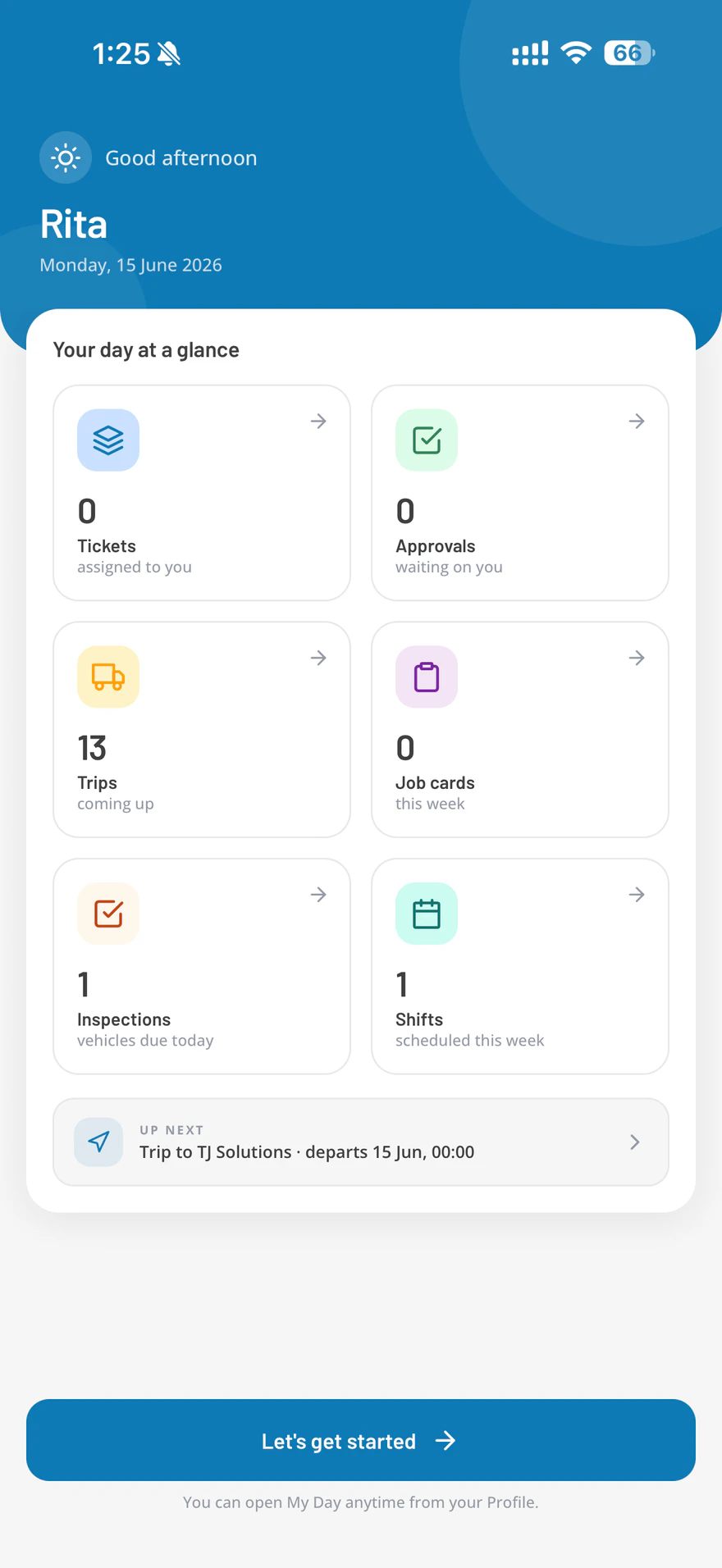
- Today's trips with the stops in order, the route, and the expected arrival time at each one.
- Start the trip and the customer link goes live. Nothing else to remember.
- Capture a signature, a photograph and an odometer reading at the stop, on the spot.
- Daily vehicle inspection before pulling off, with a failed item raised as a fault rather than mentioned in passing.
The job card in your hand, not on the dashboard
- Assigned job cards and tickets, with the checklist, the parts and the history of the machine.
- Photographs attached to the job as evidence of what was found and what was done.
- Sign-off on the device, gated on the checklist being finished.
- Captured offline and synced when the phone gets signal again, so a workshop in a dead spot is not a paper workshop.
Three subscriptions, or one
Operations software is usually sold in slices, and each slice is priced per vehicle, per user or per driver.
Two applications over one system: a web dashboard for the office and a mobile app for the field, white-labelled to your business. Built and supported in South Africa.
One price for the company, per month, in rand
Tiers are cumulative: each one includes everything below it. All prices exclude VAT.
per month, per company
For an owner-operator with a handful of vehicles.
- Fleet register and compliance
- Job cards and work orders
- Vehicle inspections
- 2 users, 2 drivers, 3 vehicles
per month, per company
For small teams running deliveries.
- Trips and dispatch
- Live tracking and customer links
- Proof of delivery
- Tickets and helpdesk
- 6 users, 6 drivers, 12 vehicles
per month, per company
For growing transport and maintenance operations.
- Clients, quotes and invoicing
- Fuel management and bulk tanks
- Inventory and stock control
- Approvals with signatures
- Schedules, shifts and leave
- KPI dashboard and audit trail
- 15 users, 15 drivers, 35 vehicles
per month, per company
For multi-crew fleets that run to a service level.
- SLA rules and automations
- Everything in Core
- 35 users, 35 drivers, 90 vehicles
per month, always confirmed by quote
The full platform with no caps.
- Every module, no limits
- Unlimited users, drivers and vehicles
- A dedicated success contact
At this size, Enterprise (from R14,949 a month, with no caps) may cost less. Ask us for a quote.
This is an estimate on monthly billing, before any annual or upfront discount and excluding VAT. We confirm your exact price in a written quote.
Each plan is one price for the company, not per seat, and includes a set number of users, drivers and vehicles; you can add more at any time and we charge for the extras. Annual billing is 15% off and upfront is 20%, and both waive the onboarding fee. If you would rather be billed per user, per vehicle or per module, we can quote it that way instead.
Questions about OPSEN, answered plainly
The things people ask before a demo. If yours is not here, ask us on WhatsApp.
Do we need to fit tracking units to our vehicles?
No. The driver’s phone is the tracker, so nothing is installed in the vehicle and a hired truck or a subcontractor can be on the system the same afternoon. Location is recorded only between Start trip and End trip, and the driver can see on their own screen when it is on.
Does the OPSEN app work without signal?
Yes. Trips, job cards, inspections and tickets are captured offline and sync when the phone finds signal again. While offline a geofence crossing is not detected, so arrival at a stop is confirmed by the driver instead.
How much does OPSEN cost?
One price for the company, per month, in rand, excluding VAT, not per seat. Solo is R499, Lite is R1,379, Core is R3,219, Pro is R6,899 and Enterprise is from R14,949, always confirmed by quote. Each plan includes a set number of users, drivers and vehicles, and extras are charged. Annual billing is 15% off and upfront is 20%.
Which businesses is OPSEN built for?
Transport and logistics, workshops and plant hire, field service, and mining and construction contractors: any operation where vehicles, technicians and jobs have to line up. A courier and a plant hire workshop are not running the same business, so each plan switches on the modules that kind of operation needs.
Can our customers track their own deliveries?
Yes. Switch on customer tracking for a trip and the client gets a link, in one tap or on WhatsApp, that opens in the browser already on their phone with the driver on a live map and the expected arrival time. There is no login, and the link goes dead shortly after the trip arrives.
Can OPSEN replace paper job cards?
Yes. A job card carries its checklist, labour and parts drawn off your stock, and cannot be signed off with checklist steps outstanding. A printed or handwritten job card can be photographed and read into a draft job for somebody to approve before it becomes real work.
Does OPSEN manage fuel?
Yes, from the Core plan. Bulk tanks with every litre in and out recorded against a vehicle, litres per hundred kilometres and cost per kilometre per vehicle, and the book level reconciled against a physical dip, so an unexplained difference becomes a number instead of a suspicion.
Can we quote and invoice from OPSEN?
Yes, from the Core plan. Quote a job from your own rates, turn the accepted quote into the trip, and build the month of completed work into a branded invoice, with exports formatted for the accounting package you already use.
Employ people under South African labour law as well? That is the other platform.
HRify runs HR and payroll from the same company, and when neither platform fits we build the custom software that does.
HRify: HR & Payroll Software
BCEA leave, timesheets, claims, a payroll built to SARS rules and industrial relations, priced per employee.
See HRifyCustom Software Development
Internal tools, customer portals, integrations and reporting, scoped in writing and supported after launch.
See Custom SoftwareWebsite Design
Fast, phone-first business websites that tell a visitor what you do and how to get hold of you.
See Website Design